S7 and OPC Classic
Settings for OPC Classic and S7 Protocol (RFC 1006) with Siemens S7-1500
An external device can access a S71 1500 CPU using the "S7 protocol (RFC 1006)" in the same way as with a S7-300/400/1200 CPU. Only simple data transmission is possible, e.g. Read/Write access to data blocks (DB). “OPC Classic” servers running on Microsoft Windows systems use this protocol for communication. An OPC UA server activated in the S7-1500 CPU does not use this protocol. All other PG operations (control/directory/etc.) must follow the extended protocol (S7-1200/1500) and are not subject of this document.
In order to be able to access a DB in an S7-1500 CPU via OPC Classic using the "S7 Protocol (RFC 1006)" which is compatible with S7-300/400/1200 CPU, some additional settings on the PLC are required:
- The optimized block access must be turned off.
- The access level must be “full access”.
- The “connection mechanisms” must allow GET/PUT.
Only global DBs can be accessed. The following instructions show you the settings in TIA Portal:
DB Property
Select the DB in the left pane under “Program blocks” and press Alt-Enter (or select “Properties…” in the context menu). Uncheck “Optimized block access”, which by default is checked.
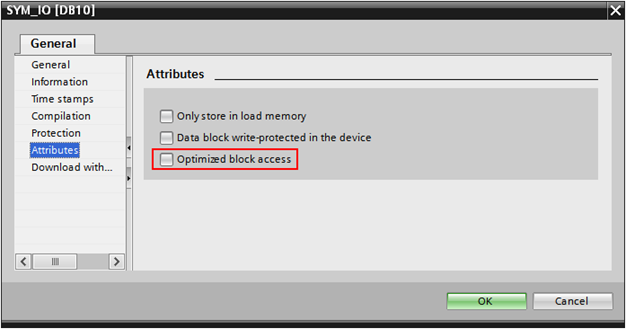 Figure-1: Uncheck “Optimized block access”
Protection
Select the CPU project in the left pane and press Alt-Enter (or select “Properties…” in the context menu). Under “Protection”, select “Full access (no protection)” and check “Permit access with PUT/GET ….” in “Connection mechanisms” as in the figure below.
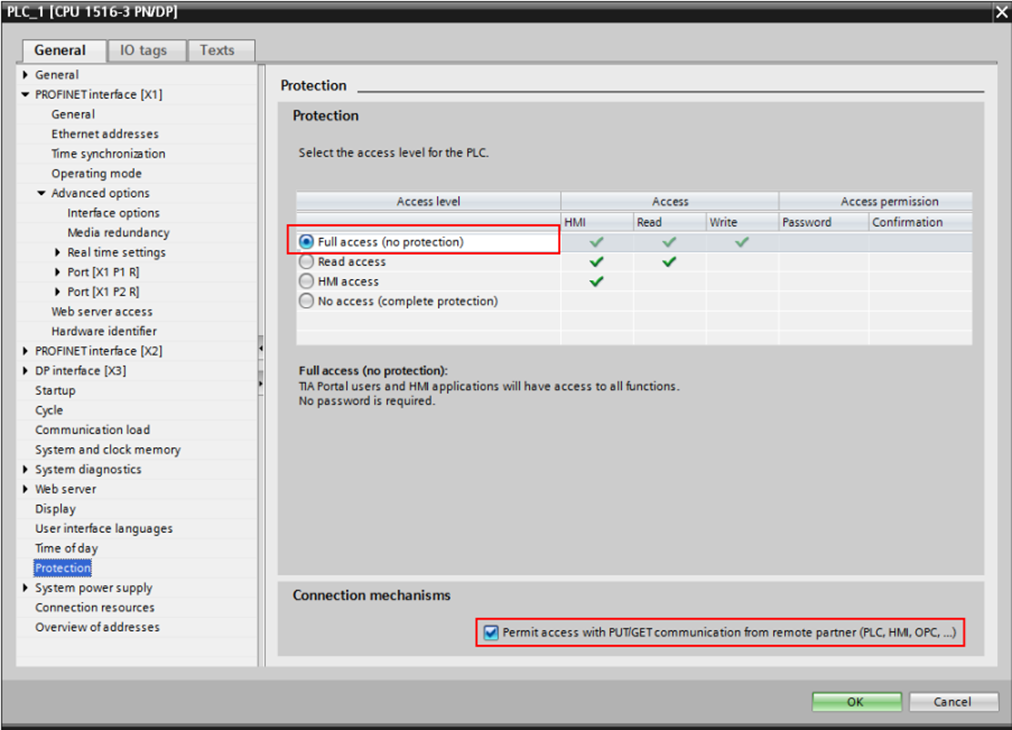 Figure 2: Check “Full access…“ and “Permit access with PUT/GET…”
Save the modified project and load it into the S7 CPU. Now the communication over “S7 Protocol (RFC 1006)” protocol is working.
Firewall
An additional requirement for the communication over “S7 Protocol (RFC 1006)” is a firewall setting (if any) which allows communication over TCP port 102. You can test this condition by using this cmdlet in a Windows PowerShell console:
Zum Beispiel:
Das Ergebnis sollte dann so ählich aussehen:
ComputerName     : 192.168.5.66
RemoteAddress    : 192.168.5.66
RemotePort       : 102
InterfaceAlias   : Ethernet0 2
SourceAddress    : 192.168.5.200
TcpTestSucceeded : True
-
S7, TIA are Registered Trademarks of Siemens AG ↩